

Amazon Ads MCP Lets AI Adjust Your Ads—Should You Let It?

Table of Contents
An AI assistant that recommends a budget increase is useful. An AI assistant that can actually change that budget deserves a closer look.
Amazon Ads MCP brings that second scenario into reach. Connected agents can access advertising tools and perform supported campaign operations. For sellers, the appeal is immediate: less time moving between reports, spreadsheets, and campaign settings. The harder question is how much authority to hand over.
Start with analysis. Allow changes only when the proposed action, supporting evidence, and approval are clear. That gives AI useful work to do while keeping spending decisions accountable.
What Amazon Ads MCP Can Actually Do
The Amazon Ads MCP Server connects compatible AI agents to Amazon Ads API capabilities. Amazon opened its public beta on February 2, 2026, for Amazon Ads partners with active API credentials. Supported use includes campaign creation and updates, performance queries, account settings, and billing information. Amazon also describes multi-step tools that assemble Sponsored Products campaigns for review and approval.
Model Context Protocol provides the common connection between an AI application and external tools. Your assistant interprets the request; the connected tool performs the supported operation.
That makes the difference between these two instructions significant:
- “Review these campaigns and suggest budget changes.”
- “Apply these budget changes to the approved campaigns.”
Treat them as separate stages in your workflow. A recommendation should be easy to inspect before it becomes an account change.
Where the Selling Partner Plugin Fits
Advertising decisions also depend on what is happening in the store. A campaign report alone cannot tell the whole operational story.
The Selling Partner plugin connects assistants such as AWS Quick and Claude to Seller Central information. Its documented scope includes listings, inventory, sales, pricing, and other selling data. It can also perform supported account changes with approval, including listing updates. Advertising data comes through the separate Ads MCP connection.
| Integration | Main role | Example question |
|---|---|---|
| Selling Partner plugin | Seller Central context and supported selling actions | Which advertised products need an inventory review? |
| Amazon Ads MCP Server | Advertising insights and supported campaign actions | Which campaigns should we examine before changing spend? |
Amazon’s November 19 holiday announcement describes the plugin as being in beta for US stores. It also explains that the two integrations require separate authorization, with different account identifiers and consent flows. AWS Quick can bring them into one workspace.
The practical benefit is a more complete decision. Before increasing spend, your team can examine the campaign alongside the product it promotes.
Decide What AI Can Do Before Connecting It
A useful operating rule is to separate reading, recommending, and changing. Give each stage its own requirements.
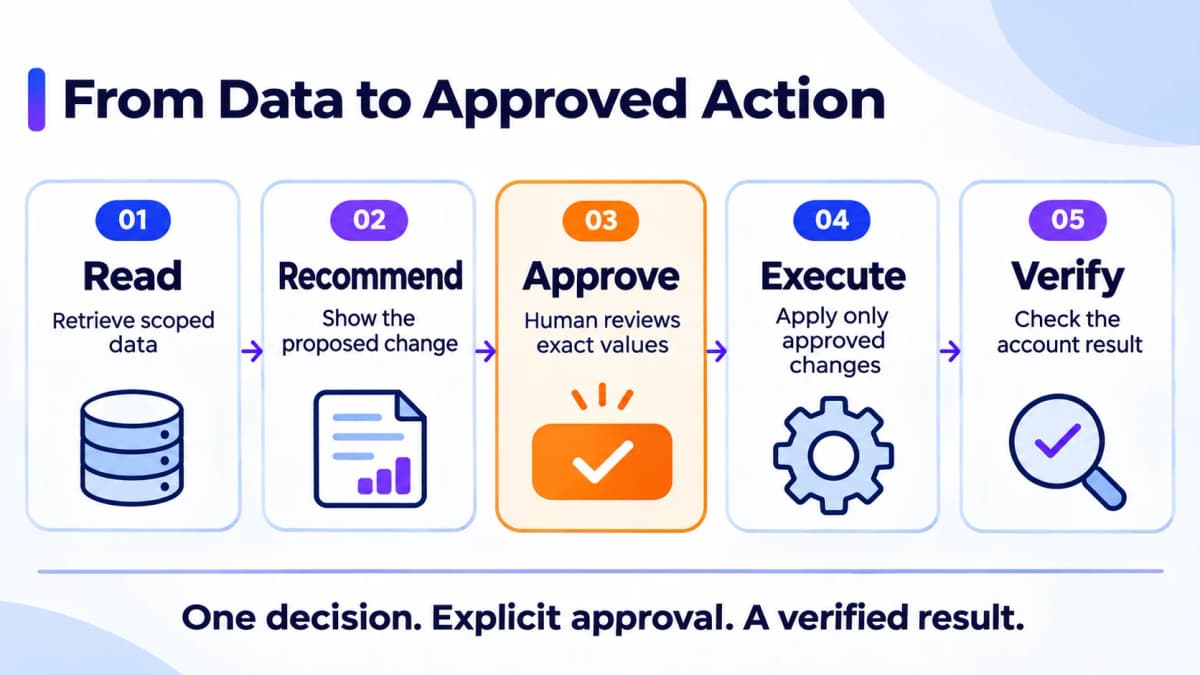
Keep approval between the recommendation and the account change.
| Stage | What AI should produce | What your team checks |
|---|---|---|
| Read | A scoped report with source labels | Correct account, dates, and metrics |
| Recommend | A proposed change with a reason | Whether the evidence supports the decision |
| Change | The exact approved operation | Campaign IDs, old and new values, and result |
This matters because a reasonable explanation can conceal an incomplete decision. “Increase the budget on your best campaign” leaves several questions unanswered. Best by revenue, efficiency, or contribution to a launch? Over which period? Does the product have enough available stock? Is the campaign actually constrained by its budget?
Resolve those questions in your Amazon PPC optimization process before delegating the action. Otherwise, the assistant has to supply assumptions your team never agreed on.
Make Approval Specific
Consider this hypothetical proposal:
Change Campaign A’s daily budget setting from $60 to $75. Keep its bids, targeting, and status unchanged. Review the result tomorrow.
The setting change is $15, or 25%. Those figures describe the proposed configuration change, not a forecast of additional spend or sales.
Before approving it, request the campaign ID, current setting, evidence for the recommendation, and the person responsible for reviewing the result. If the assistant also wants to change bids, that should appear as a separate proposal.
Put Controls in the Application
A prompt saying “ask before making changes” is useful, but the application should enforce the approval step too. Check which tools the assistant can invoke and how it requests permission for actions.
MCP’s tool specification recommends human oversight and confirmation for operations; it does not prescribe one universal interaction model. Verify the controls in the AI client and integration you actually use.
Five Checks Before the First Change
1. Confirm the Account
Record the marketplace, selling account, and advertising profile involved. Include identifiers in proposed changes, especially when similar campaign names appear across multiple accounts.
An approval should identify the exact destination of the action. “The US campaign” is too vague when your team manages several brands.
2. Match the Reporting Scope
Specify the date range, time zone, campaign type, and metrics. Compare like-for-like periods and retain the reporting window alongside each figure.
Keep store sales and ad-attributed sales separately labeled. Combining them without an explicit definition can make a polished summary hard to interpret.
3. Separate Facts From Assumptions
Ask the assistant to distinguish retrieved values, calculations, and missing inputs. If a recommendation depends on product margin or incoming inventory, provide that information or leave the decision pending.
For example, knowing a product’s selling price does not establish its margin. Ask which costs were included before accepting a profitability argument.
4. Inspect the Proposed Difference
Review the old and new value for every setting. For a batch of changes, require a complete list before approval and define whether partial execution is acceptable.
Keep the first batch small enough that a person can check every row. A short list of clear decisions is more useful than a large batch whose rationale no one has reviewed.
5. Verify the Result
After execution, retrieve the updated settings and compare them with the approved proposal. Record successes, failures, and unchanged items separately.
If a request times out, inspect the current state before retrying. The next step should follow what actually happened in the account, rather than an assumption that the first attempt failed.
Start With One Read-Only Review
Choose a small campaign set and run the same review several times before allowing writes. This helps your team spot mismatched identifiers, missing fields, and inconsistent interpretations.
Use this prompt as a starting point:
Review the campaigns in [CAMPAIGN IDS] for [ADVERTISING PROFILE] in [MARKETPLACE], covering [START DATE] to [END DATE] in [TIME ZONE].
Return available spend, attributed sales, orders, and current budget settings. Identify each source and reporting period. Show the inputs for calculated metrics and mark missing values as unavailable.
Where authorized seller data is available, add relevant inventory observations for the advertised ASINs. Keep that data separate from advertising metrics.
Propose changes in a separate table with campaign ID, current value, proposed value, supporting evidence, and unresolved questions. Do not modify anything.
Check the output against the underlying records. When the report is dependable, test one approved change and verify it end to end. Expand only after that process works consistently.
Conclusion: Give AI Better Evidence Before More Authority
Amazon Ads MCP makes execution more accessible. Your team still needs to define what a good decision looks like and how to verify the result.
Some decisions also need context beyond your own account. If an assistant recommends more spend, competitor positioning, keyword relevance, and customer feedback can help you examine the proposal.
How Nexscope MCP Differs From Amazon’s Tools
Nexscope is an independent ecommerce data platform. Its MCP connection gives your own AI assistant access to Nexscope tools; it is not Amazon’s official Ads MCP Server or Selling Partner plugin. MCP is the shared connection standard. The provider, available tools, data sources, and permissions belong to each separate service.
| Service | Provider | Role in this workflow |
|---|---|---|
| Amazon Ads MCP Server | Amazon Ads | Access authorized advertising data and perform supported campaign operations. |
| Selling Partner plugin | Amazon | Access Seller Central context and perform supported selling-account actions with approval. |
| Nexscope research tools via MCP | Nexscope | Add product, competitor, keyword, review, and market research to your assistant’s analysis. |
The Nexscope Amazon MCP tools supply the research capabilities highlighted below to your connected AI assistant. Connecting these tools does not automatically grant access to your private Amazon account or permission to change campaigns. Any account-connected operation needs its own supported integration and relevant Amazon authorization.
For example, your assistant could use Nexscope keyword and competitor research to investigate a targeting opportunity, then use authorized Amazon Ads tools to review your campaign results and propose a change. You configure the connections separately and approve the specific action before execution.
Key Features
- Product details and ASIN history: Examine product attributes, prices, and available historical records.
- Competitor research: Identify relevant products for comparison.
- Amazon ASIN keywords: Investigate the search terms associated with a product’s traffic.
- Search visibility: Compare brand presence in organic and sponsored results.
- Market research: Assess niche size, competition, and seller concentration.
- Reviews and sales estimates: Explore customer feedback and estimated product demand, keeping estimates distinct from actual orders.
Use those inputs to challenge or refine a recommendation. Keep the resulting advertising change tied to an explicit approval and a verified account outcome.
Add Market Context to Your Amazon Decisions
Explore Nexscope research tools and connect relevant ecommerce data to your own AI assistant through MCP.
Explore Ecommerce Data →Frequently Asked Questions
Can Amazon Ads MCP change my campaigns?
Yes. Connected agents can use supported Amazon Ads operations, including campaign management. Available actions depend on the integration and permissions. Establish a review step that shows the exact changes before they are executed.
Is the Selling Partner plugin read-only?
No. Amazon documents supported account changes, including listing edits, with approval before execution. The plugin supplies selling-account context; advertising access comes through the separate Ads MCP integration.
Should I let AI manage my entire ad account immediately?
Start with a limited reporting task, then test individual approved changes. Expand the scope when your team can reliably trace each decision from source data to proposal, approval, and confirmed result.
Does an AWS Quick subscription authorize both integrations?
The integrations have separate authorization flows. Amazon’s holiday offer provides eligible primary selling account holders worldwide with 12 months of AWS Quick Plus and access for ten additional delegated users when they sign up by December 31, 2026. Complete the relevant integration setup separately.
What should I check after AI adjusts a budget?
Confirm the correct advertising profile and campaign were changed, verify the new setting, and check that unrelated settings remained intact. Save the approved proposal and execution result, then review performance using the evaluation period your team selected.
Sources
- Amazon Ads. (2026). Introducing the Amazon Ads MCP Server, the foundation for the next generation of advertising workflows. Retrieved from advertising.amazon.com
- Amazon Staff. (2026). Preparing for the 2026 Holiday Shopping Season with Amazon’s Selling Partner plugin & Ads MCP. Retrieved from sell.amazon.com
- Amazon Selling Partner API. (2026). Amazon Selling Partner plugin. Retrieved from developer.amazonservices.com
- Model Context Protocol. (2025). Tools — Specification 2025-11-25. Retrieved from modelcontextprotocol.io